
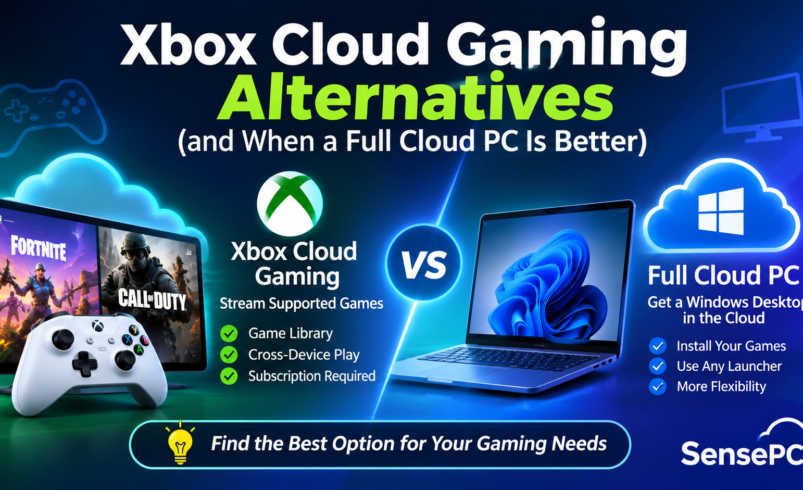

Game PC rental is becoming a popular option for gamers who want access to powerful computing hardware without purchasing an expensive gaming desktop. Instead of investing in a high-end GPU, processor, and memory, users can rent a remote gaming computer and access it through an internet connection.
If you are searching for a Shadow PC alternative, comparing cloud desktop services, or exploring flexible gaming solutions, SensePC and Sense Cloud offer another approach to accessing remote computing power.
1. What Is Game PC Rental?
Game PC rental allows users to access a powerful computer remotely without owning the physical hardware. These computers typically include dedicated or allocated CPU, GPU, and RAM resources to support demanding applications and compatible PC games.
Instead of purchasing a gaming desktop, you pay for access to remote computing resources according to the provider’s pricing model.
2. Why Rent a Gaming PC Instead of Buying One?
Building a gaming PC can require a significant upfront investment. Renting provides another option for users who want temporary or flexible access to powerful hardware.
Benefits include:
-
Lower upfront hardware investment.
-
Access to remote GPU computing resources.
-
No need to maintain physical gaming hardware.
-
Gaming access from compatible laptops and Macs.
-
Flexible rental and usage options.
-
Additional computing resources when required.
3. Looking for a Shadow PC Alternative?
Shadow PC is a cloud computer service that provides access to a complete remote Windows environment. However, users comparing alternatives may prefer different pricing structures, hardware configurations, or usage flexibility.
When evaluating a Shadow PC alternative, consider:
-
Hourly versus monthly pricing.
-
GPU performance and availability.
-
RAM and CPU configurations.
-
Windows desktop accessibility.
-
Server locations and latency.
-
Supported gaming applications.
-
Session restrictions and storage options.
4. SensePC: A Flexible Alternative for Game PC Rental
SensePC provides remote Windows 11 cloud computers powered by NVIDIA L4 GPU technology. It allows users to access computing resources without purchasing a physical gaming desktop.
With flexible computing options, SensePC can be useful for people who need remote access for gaming, productivity, and other demanding workloads.
Its key features include:
-
Windows 11 cloud desktop environments.
-
NVIDIA L4 GPU-powered configurations.
-
Remote access from compatible devices.
-
Support for Steam and Epic Games applications.
-
Hourly, daily, and monthly billing options.
-
Pay-as-you-go computing flexibility.
5. What Is Sense Cloud?
Sense Cloud provides access to remote computing resources through cloud-based infrastructure. Instead of depending entirely on local hardware, users can connect to remote computers for compatible applications and workloads.
Cloud computing can be useful for gamers, developers, students, and professionals who need access to additional processing and graphics capabilities.
6. Game PC Rental vs Traditional Gaming PC
| Feature | Game PC Rental | Traditional Gaming PC |
|---|---|---|
| Initial investment | Lower | Higher |
| Hardware ownership | No | Yes |
| Maintenance | Provider-managed | User-managed |
| Access | Internet-based | Local |
| Hardware upgrades | Provider-dependent | User-controlled |
| Payment | Rental or usage-based | Hardware purchase |
The right choice depends on how frequently you play, your budget, and whether you prefer remote or local gaming.
7. How to Choose the Best Cloud Gaming PC Rental
Before renting a gaming PC, evaluate the following:
-
Graphics performance: Check GPU specifications and allocation.
-
Processing power: Compare available CPU cores.
-
Memory: Ensure sufficient RAM for your games.
-
Connectivity: Check latency and server locations.
-
Pricing: Compare hourly, daily, and monthly costs.
-
Compatibility: Verify support for your preferred games and launchers.
A service that offers flexible billing and suitable GPU resources can be a practical choice for occasional and regular users.
Frequently Asked Questions
1. What is game PC rental?
Game PC rental allows users to access remote gaming computers without purchasing physical hardware.
2. Is SensePC a Shadow PC alternative?
Yes. SensePC offers Windows 11 cloud computers with NVIDIA L4 GPU technology and flexible billing options.
3. Can I rent a gaming PC by the hour?
Yes. Some cloud PC providers, including SensePC, offer hourly computing options.
4. Is renting a gaming PC cheaper than buying one?
It can be more economical for occasional gaming because it avoids a large upfront hardware purchase. Long-term costs depend on usage and rental rates.
5. Can I play AAA games on a rented cloud PC?
Yes, provided the GPU configuration, game compatibility, and network conditions meet the game’s requirements.
6. Does SensePC support Steam and Epic Games?
SensePC supports access to Steam and Epic Games applications, subject to individual game and configuration compatibility.
7. Can I use a rented gaming PC on a Mac?
Yes. You can connect to a compatible Windows cloud desktop from a Mac using remote access software.
8. What is the difference between SensePC and Sense Cloud?
SensePC provides access to remote cloud computing environments, while Sense Cloud refers to the associated cloud computing offering and infrastructure.
9. Do I need a gaming laptop to use a cloud gaming PC?
No. A compatible laptop with a stable internet connection can access a remote gaming computer.
10. What should I check before choosing a Shadow PC alternative?
Compare GPU performance, CPU resources, pricing, server locations, desktop access, supported applications, and billing flexibility.