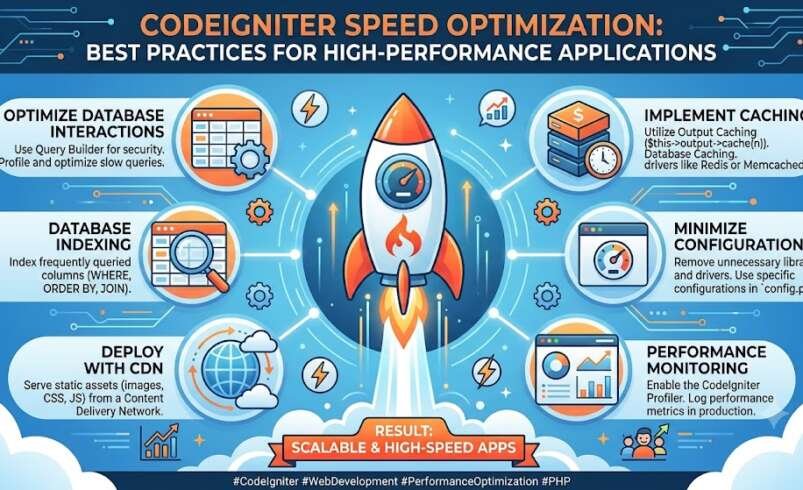

In today’s competitive digital landscape, application speed is more important than ever. Whether you’re building a business portal, SaaS platform, CRM, or custom web application, users expect pages to load quickly and respond instantly. This is why CodeIgniter speed optimization should be a priority throughout the development lifecycle.
CodeIgniter is known for its lightweight architecture and excellent performance compared to many PHP frameworks. However, as applications grow in complexity, database queries increase, third-party integrations expand, and traffic rises, performance can gradually decline. Fortunately, with the right optimization strategies, developers can maintain fast, scalable, and reliable applications.
This guide explores proven techniques to improve CodeIgniter performance while creating a better experience for both users and developers.
Why CodeIgniter Performance Matters
A fast application benefits everyone. Visitors enjoy quicker page loads, businesses reduce infrastructure costs, and developers create applications that scale more efficiently.
Optimizing your CodeIgniter application can help you:
- Improve page load speed
- Reduce server response time
- Handle more concurrent users
- Lower server resource consumption
- Deliver smoother user experiences
- Improve application stability
- Support long-term scalability
Performance optimization isn’t about chasing benchmark scores—it’s about creating applications that remain fast as your business grows.
Optimize Your Database Queries
Database operations often account for the largest portion of application response time.
To improve performance:
Use Proper Database Indexes
Indexes reduce query execution time by helping the database locate records more efficiently.
Retrieve Only Necessary Columns
Instead of selecting every column, request only the information required for a specific operation.
Avoid Duplicate Queries
Repeated database requests increase response time. Cache frequently used data whenever possible.
Optimize Relationships
Well-structured joins and normalized database design reduce unnecessary processing.
Regular database analysis helps identify slow queries before they become performance bottlenecks.
Enable Effective Caching
Caching is one of the easiest ways to improve CodeIgniter speed optimization.
CodeIgniter supports several caching mechanisms that reduce repeated processing.
Common caching methods include:
- Page caching
- Query caching
- File caching
- Redis caching
- Memcached integration
- Session optimization
By serving cached content whenever possible, applications reduce server workload and improve response times.
Minify CSS and JavaScript
Large CSS and JavaScript files increase loading time.
Optimize front-end assets by:
- Removing unused CSS
- Minifying JavaScript
- Combining static resources
- Deferring non-essential scripts
- Eliminating render-blocking resources
These improvements allow browsers to display content much faster.
Optimize Images
Images often contribute significantly to page weight.
Improve image delivery by:
- Compressing uploaded images
- Using responsive image sizes
- Serving WebP or AVIF formats
- Lazy loading off-screen images
- Eliminating unnecessary image dimensions
Smaller image files reduce bandwidth usage while maintaining visual quality.
Improve Server Configuration
Application performance depends heavily on the hosting environment.
Recommended optimizations include:
- Latest stable PHP version
- OPcache enabled
- HTTP/2 or HTTP/3
- Brotli or Gzip compression
- Optimized PHP-FPM settings
- SSD storage
- Fast database servers
A properly configured server allows CodeIgniter applications to serve requests more efficiently.
Reduce Third-Party Dependencies
Many applications become slower because they rely on unnecessary external libraries.
Review your project regularly and remove:
- Unused packages
- Outdated libraries
- Redundant plugins
- Excessive external scripts
- Multiple tracking services
Keeping dependencies lean improves both security and performance.
Optimize API Performance
Modern CodeIgniter applications frequently expose REST APIs.
To improve API speed:
- Return only required data
- Use pagination
- Cache API responses
- Compress JSON output
- Optimize authentication
- Reduce unnecessary database queries
Fast APIs improve the experience for mobile apps, frontend frameworks, and third-party integrations.
Use CodeIgniter Tools for Performance Monitoring
Optimization should always be based on real performance data.
Useful CodeIgniter tools and monitoring techniques include:
- Application profiling
- Query execution analysis
- PHP error logging
- Memory usage monitoring
- Server monitoring
- Cache performance tracking
- Database profiling
Regular monitoring helps developers identify issues before users notice them.
Common Mistakes That Slow Down CodeIgniter Applications
Even experienced developers occasionally introduce performance issues.
Some common mistakes include:
- Excessive database queries
- Poor database indexing
- Large unoptimized images
- Loading unnecessary helpers and libraries
- Keeping debug mode enabled in production
- Inefficient loops
- Excessive HTTP requests
- Missing browser caching
- Unoptimized session handling
Avoiding these issues can significantly improve application responsiveness.
Modern Performance Optimization Strategies
Today’s web applications require more than basic caching.
Modern optimization focuses on:
- Intelligent asset delivery
- Automated caching
- Database tuning
- CDN integration
- Browser optimization
- Efficient code architecture
- Continuous performance monitoring
- AI-assisted optimization
These practices help applications remain fast as traffic and functionality increase.
Choosing the Right Optimization Solution
Many organizations use specialized optimization solutions alongside CodeIgniter’s built-in features to simplify performance management.
When evaluating optimization platforms, consider features such as:
- Automatic caching
- Image optimization
- CSS and JavaScript optimization
- Database optimization
- Performance monitoring
- CDN compatibility
- Core Web Vitals improvements
- Intelligent asset management
The right solution reduces manual maintenance while ensuring consistent website performance.
Frequently Asked Questions
Is CodeIgniter already fast?
Yes. CodeIgniter is recognized for its lightweight architecture and efficient execution. However, application speed still depends on database design, hosting infrastructure, frontend optimization, and coding practices.
Which CodeIgniter tools help improve performance?
Developers commonly use profiling tools, query analyzers, caching systems, application monitoring platforms, and debugging utilities to identify and resolve performance bottlenecks.
Does caching improve CodeIgniter performance?
Absolutely. Proper caching reduces repeated processing, lowers database load, and significantly improves response times for frequently accessed content.
How often should a CodeIgniter application be optimized?
Performance should be reviewed regularly, especially after feature releases, database updates, server migrations, or significant traffic growth.
Final Thoughts
CodeIgniter speed optimization is an ongoing process that combines efficient coding practices, database optimization, caching strategies, server tuning, and continuous monitoring. While CodeIgniter provides a strong foundation for high-performance PHP applications, long-term success depends on maintaining and improving performance as projects evolve.
By leveraging the right CodeIgniter tools, optimizing database operations, reducing unnecessary resources, and implementing intelligent caching strategies, businesses can build applications that remain fast, scalable, and reliable. Investing in performance today not only enhances user satisfaction but also prepares your application to handle future growth with confidence.