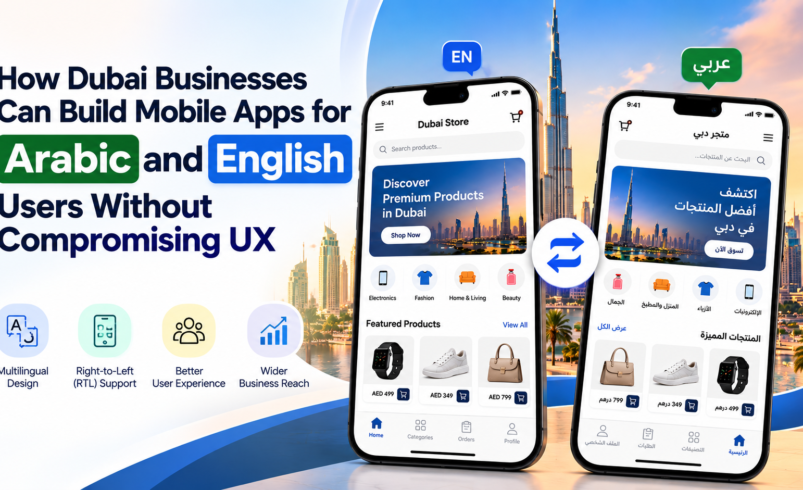

Dubai is home to customers who communicate in different languages and have diverse digital preferences. For businesses targeting this market, offering both Arabic and English in a mobile application can make services more accessible and improve the overall user experience.
However, simply translating English content into Arabic is not enough. Businesses must consider right-to-left (RTL) layouts, navigation, typography, payment flows and cultural preferences when planning mobile app development in Dubai.
1. Design for Both Languages from the Beginning
Arabic and English follow different reading directions. English interfaces generally use a left-to-right (LTR) layout, while Arabic requires right-to-left (RTL) support.
Developers should plan for both layouts during the UI/UX design stage rather than adding Arabic support after the application is complete. Navigation menus, icons, alignment and screen transitions should adapt correctly when users change languages.
2. Make Language Switching Simple
Users should be able to switch between Arabic and English without losing their progress or restarting the application.
A visible language selector, consistent terminology and properly translated buttons can make the experience more convenient. The selected language should remain consistent across relevant screens, notifications and account settings.
For businesses investing in custom mobile app development in Dubai, this flexibility helps create an experience that serves a wider customer base.
3. Adapt Forms, Payments and Checkout
Language support must extend beyond the home screen. Registration forms, address fields, payment screens and checkout processes should work correctly in both languages.
Businesses should test Arabic text wrapping, mixed-language content, number formats and validation messages. Payment integrations should also support the business’s target market and chosen payment methods.
A well-designed multilingual checkout can reduce confusion and help customers complete transactions more confidently.
4. Choose Readable Arabic Typography
Arabic fonts need to remain clear across different screen sizes and devices. Developers should consider line height, spacing, font weight and text alignment to avoid crowded interfaces.
Buttons and content containers should also accommodate longer translations without clipping text or disrupting the layout.
Working with experienced mobile app developers in Dubai can help businesses identify these design issues before launch.
5. Localise the Entire Customer Journey
Effective localisation goes beyond language translation. Depending on the application, businesses may need to consider local terminology, date formats, customer support preferences, delivery addresses and regionally relevant content.
For example, an eCommerce app may need bilingual product descriptions, Arabic customer support and a checkout experience that works consistently in both languages.
6. Test the App with Arabic and English Users
Before launch, test the application with users who regularly use each language. Check navigation, screen alignment, form completion, payment steps and notifications on different devices.
User testing can reveal issues that automated translation or basic functionality checks may miss. Businesses should continue monitoring feedback after launch and update content as their services evolve.
Final Thoughts
Building an Arabic-English mobile app requires coordinated planning across design, development, localisation and testing. Businesses that treat both languages as core product requirements can deliver a more consistent experience without sacrificing usability.
For companies planning mobile app development in Dubai, Apptunix UAE can help explore multilingual app design, RTL functionality and scalable development solutions tailored to business requirements.