How to Create Accessible Captions and Descriptions for Digital Images
Learning how to write accessible image captions and descriptions helps make digital content easier to understand for everyone, including people with visual impairments. Well-written alt captions, meaningful photo captions, and descriptive alternative text provide context, explain important visual details, and improve the experience for people using assistive technology. Whether you publish blog posts, news articles, educational resources, or social media updates, understanding how these elements work together helps you communicate your message more clearly and inclusively.
Images often convey information that surrounding text cannot fully explain. However, not everyone can see an image or interpret its visual details. Accessible image descriptions and captions bridge this gap by making essential information available in appropriate text formats. The key is knowing when to use a visible caption, when to provide alternative text, and how to write each one effectively.
What Are Accessible Image Captions and Descriptions?
Accessible image captions and descriptions are text elements that explain an image’s subject, purpose, or relevant visual information. Although these terms are sometimes used interchangeably, they serve different functions.
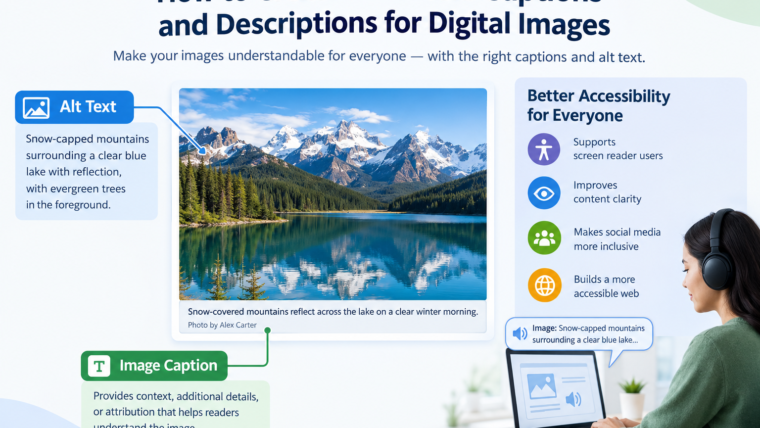
An image caption usually appears visibly beneath or beside an image. It provides context, identifies people or places, explains an event, or adds information that helps readers interpret the visual.
Alternative text, commonly called alt text, is an image’s textual alternative. It is typically provided through an HTML alt attribute and can be announced by screen readers when the image needs a textual equivalent.
For example, a news article might contain a photograph of volunteers cleaning a beach. A visible caption could explain where and when the cleanup occurred, while the alt text could describe volunteers collecting plastic waste along the shoreline.
Both elements support accessibility, but they should complement rather than unnecessarily repeat each other.
Why Are Accessible Image Captions Important?
Accessible image captions make digital information easier to understand, navigate, and interpret. They benefit people with different accessibility needs while improving the overall clarity of online content.
Support People Who Use Screen Readers
Screen readers convert digital text into speech or braille output. When an image contains meaningful information, appropriate alternative text allows users who cannot see it to understand its relevant content.
A visible caption alone does not automatically provide an image’s alternative text. The image should have suitable alt text when it conveys information that users need to understand.
Provide Context for Complex Images
Some images require more explanation than a short description can provide. Charts, diagrams, infographics, and instructional screenshots may contain several important details.
A concise caption can introduce the image, while surrounding text or a longer description explains the information needed to understand it.
Improve Content Clarity for Everyone
Captions help readers connect an image to the surrounding discussion. They can identify unfamiliar locations, explain historical events, credit photographers, or clarify why a particular visual matters.
These benefits extend beyond accessibility. Clear captions also make articles easier to scan and help readers understand the relationship between text and images.
Make Social Media Posts More Inclusive
Social media images frequently communicate information that is missing from the accompanying post text. Adding appropriate alt text and writing informative captions helps make these posts more accessible.
For example, a promotional graphic containing an event date, location, and registration deadline should not rely exclusively on text embedded in the image. Important information should also be available in the post text or another accessible format.
Alt Text vs. Image Captions: What’s the Difference?
Understanding the difference between alt text and image captions is essential when creating accessible digital content. Both describe or explain images, but they appear in different places and serve different purposes.
| Feature | Alt text | Image caption |
|---|---|---|
| Primary purpose | Provides a textual alternative to meaningful image content | Provides visible context or additional information |
| Typical location | Image’s HTML alt attribute |
Beneath or beside the image |
| Visibility | Usually not displayed on the page | Visible to readers |
| Screen reader support | Can be announced as the image’s alternative | Read as ordinary page text when encountered |
| Best use | Conveying the essential information or function of an image | Explaining context, attribution, or significance |
| Typical length | Concise and relevant to the image’s purpose | Varies according to the information being communicated |
When Should You Use Alt Text?
Use alt text when an image communicates meaningful information that would otherwise be unavailable to someone who cannot see it.
For example:
Image: A bar chart comparing monthly website traffic.
Alt text: “Bar chart showing website traffic increasing from 12,000 visits in January to 18,000 in April.”
This description communicates the chart’s main takeaway rather than simply identifying it as a chart.
For a decorative image that adds no meaningful information, an empty alt attribute (alt="") is generally appropriate in HTML. This allows assistive technology to skip the image when it has no useful content to convey.
When Should You Use a Text Caption?
Use a visible caption when readers benefit from information that explains or contextualizes an image.
For example:
Image: Volunteers planting trees in a community park.
Caption: “Local volunteers planted 200 native trees during the community’s annual environmental restoration event.”
The caption explains the event’s significance and adds context beyond the image itself.
Can an Image Have Both?
Yes. Many images benefit from both alt text and a visible caption, provided each serves a useful purpose.
The alt text should communicate the image’s essential visual information, while the caption can supply additional context, attribution, or background.
Avoid duplicating the same sentence in both places unless the information genuinely needs to be conveyed in both contexts.
How to Write Accessible Image Captions
Writing effective, accessible captions starts with understanding why the image is included and what readers need to learn from it. The goal is not to describe every visible detail, but to provide the information that makes the image meaningful.
1. Identify the Image’s Purpose
Before writing a caption, consider what the image contributes to the page.
Is it documenting an event, illustrating a process, supporting a claim, introducing a person, or helping readers understand a concept?
The answer determines which details matter.
For example, a photograph used in a travel article may need a location and landmark, while an image accompanying a scientific explanation may require information about the process being demonstrated.
2. Describe the Most Relevant Details
Focus on the image’s subject and the details necessary to understand its purpose.
Instead of writing:
“People standing outside.”
Write:
“Three volunteers distribute food parcels outside a community center.”
The second example gives readers more useful information without becoming unnecessarily long.
However, do not invent details that cannot be verified. If the image does not establish someone’s identity, occupation, or intentions, avoid presenting those assumptions as facts.
3. Add Context When It Helps
A good caption can answer questions such as who, what, where, and when. Include only the details that are relevant and supported by reliable information.
For example:
“Students present their renewable energy projects at the school’s annual science exhibition in Lahore.”
This caption identifies the activity, participants, event, and location. If those details are already clearly established in the surrounding text, a shorter caption may be sufficient.
4. Use Clear, Natural Language
Accessible captions should be straightforward and easy to understand. Prefer familiar words, specific descriptions, and concise sentences.
Avoid unnecessary technical terminology, vague phrases, and long strings of visual details that do not contribute to the image’s meaning.
A caption should explain the image, not make readers work harder to interpret it.
5. Avoid Repeating Nearby Information
Check the paragraph immediately before and after the image. If the same information is already provided, the caption may be able to add a different detail.
For example, if a paragraph already explains where a landmark is located, the caption might identify the architectural feature shown rather than repeating the location.
6. Provide Attribution Where Appropriate
Photographs, illustrations, and other visual assets may require photographer credits, copyright information, or source attribution.
Include this information when appropriate and follow the relevant licensing requirements. Keep attribution distinct from the descriptive content when that improves readability.
Image Captions Examples for Different Types of Content
The best image captions examples demonstrate how the same basic principles apply across different formats. A useful caption describes relevant details, supplies context, and avoids unsupported assumptions.
News Photography
Image: Emergency workers assist residents after flooding.
Caption example: “Emergency workers help residents move supplies from a flooded street following heavy rainfall.”
This caption describes the visible action without making unsupported claims about the event’s cause or the identities of the people shown.
Educational Content
Image: A diagram showing the water cycle.
Caption example: “The water cycle illustrates how evaporation, condensation, and precipitation move water through the environment.”
This explains the diagram’s educational purpose. If the diagram contains essential details, those details should also be available through appropriate alternative text or a longer description.
E-commerce Product Images
Image: A black backpack with several compartments.
Caption example: “Black travel backpack featuring multiple storage compartments and adjustable shoulder straps.”
The description highlights useful product features without adding claims about capacity or durability that have not been verified.
Travel and Photography Blogs
Image: A mountain lake surrounded by snow-covered peaks.
Caption example: “Snow-covered mountains reflect across the lake on a clear winter morning.”
This communicates the main visual details without unnecessary embellishment. Add a verified location if it helps readers understand the photograph.
Data Visualizations
Image: A line chart showing monthly sales growth.
Caption example: “Monthly sales increased steadily from February through June, with the strongest growth occurring in May.”
A caption can communicate the main finding, while a longer description or accessible data table may be necessary when readers need access to the chart’s complete data.
How to Write Captions for Photos: Best Practices
If you want to understand how to write captions for photos effectively, start by separating what the image shows from what the reader needs to know about it.
A photograph may communicate an action, emotion, setting, or event. Its caption should identify the most relevant elements without turning into a complete narrative.
Follow these practical guidelines:
- Be specific: Replace vague phrases with concrete descriptions of the subject or activity.
- Stay accurate: Verify names, dates, locations, and event details before publishing.
- Keep it concise: Include the most useful information without describing every minor detail.
- Consider the audience: Choose language and context that suit the article’s readers.
- Avoid assumptions: Do not infer someone’s identity, feelings, relationships, or intentions without evidence.
- Explain unfamiliar context: Provide a brief explanation when readers might not understand the image’s significance.
- Use consistent formatting: Apply a consistent caption style throughout the page or publication.
- Check for redundancy: Make sure the caption contributes something useful beyond nearby text.
There is no universal ideal caption length. A simple photograph may need only a few words, while a news image or technical illustration may require more context.
How to Add Alt Text on Instagram and Other Social Platforms
Social media accessibility involves more than writing a good caption beneath a post. Platform captions, image descriptions, embedded text, and accessibility settings all play different roles.
How to Add Alt Text on Instagram
Instagram provides alternative-text functionality for images, allowing creators to add descriptions intended to help people using screen readers.
When preparing an Instagram post:
- Select the image you want to publish.
- Continue to the post’s advanced accessibility settings, where available.
- Find the option for writing or editing alt text.
- Enter a concise description of the image’s meaningful content.
- Review the description before publishing.
The exact interface may change across app versions and devices.
For effective IG alt text, describe the important subject and action rather than repeating the post caption or filling the description with hashtags and keywords.
For example:
Image: A baker decorating a birthday cake with strawberries.
Alt text: “A baker places fresh strawberries around the edge of a birthday cake.”
Visible Instagram caption: “A little sweetness for your next celebration. Our strawberry birthday cakes are available to order this week.”
The alt text describes the visual, while the post caption communicates the promotional message.
Twitter Image Accessibility
On X, formerly Twitter, users can add image descriptions through the platform’s available accessibility features. The precise controls may vary depending on the interface.
For effective Twitter image accessibility:
- Describe the meaningful content of the image.
- Include essential text displayed within an image.
- Avoid repeating the entire accompanying post when it adds no useful information.
- Provide a text alternative for information conveyed exclusively through a graphic.
A Twitter image caption overlay is text placed directly over an image. Although overlays can help communicate a message visually, they are not a substitute for an appropriate image description.
For example, an image promoting a webinar might display “Free Webinar, November 12” over a photograph. The accompanying post should also include the date and event details as readable text, while the image description can explain the graphic’s relevant visual content.
Writing Accessible Social Media Posts
Accessible social media posts should communicate essential information without depending entirely on visual presentation.
Use descriptive alt text for meaningful images, maintain readable contrast, avoid overly small text in graphics, and provide a text equivalent for important information contained in infographics.
When sharing a complex graphic, consider including a short summary in the post and linking to a page with a complete text explanation or accessible data table.
Accessibility Captions for News and Editorial Content
News publishers and editorial teams often use images to document events, introduce people, and provide evidence or context. Their captions should be informative, accurate, and consistent with editorial standards.
Effective accessibility captions news teams publish should identify the relevant subject or event, include verified contextual details, and avoid speculation.
For example:
Weak caption: “A worried woman stands near a building.”
Better caption: “A resident waits outside the community center after the building was evacuated.”
The second caption describes the observable situation and provides context without assuming the person’s emotional state.
News organizations should also distinguish between a photograph’s visible caption and its alternative text. The caption may include the photographer’s credit, date, location, and editorial context, while alt text communicates the essential visual information for readers who cannot see the image.
For complex images, including maps, charts, and infographics, a short caption may not be enough. Provide a longer description or an accessible text version of the essential information.
Common Image Caption Accessibility Mistakes to Avoid
Even well-intentioned publishers can make mistakes that reduce accessibility.
Treating Captions and Alt Text as Identical
A visible caption does not automatically replace an image’s alt text. Make sure meaningful images have an appropriate textual alternative when required.
Using Vague Descriptions
Phrases such as “nice picture” or “image of a person” rarely provide enough information. Describe the subject or action that matters in the current context.
Stuffing Descriptions With Keywords
Alt text should describe an image’s purpose and content, not serve as a place to repeat SEO keywords. Search terms should appear only when they accurately describe what the image communicates.
Including Unverified Details
Do not guess people’s names, locations, relationships, or activities. Use verified information or limit the description to observable details.
Ignoring Text Embedded in Images
When an image contains important instructions, figures, dates, or announcements, ensure that this information is also available as accessible text.
Describing Decorative Images Unnecessarily
Purely decorative images generally do not need verbose descriptions. In HTML, an empty alt attribute is usually appropriate when the image adds no information or function.
Overlooking Complex Images
Charts, maps, and diagrams can communicate more information than a short caption can convey. Provide a suitable longer description or an accessible equivalent when necessary.
Image Accessibility Best Practices for Website Owners
Website owners, bloggers, designers, and content teams can make image accessibility part of their regular publishing workflow.
Before publishing an image, check the following:
- Identify whether the image is informative, functional, decorative, or complex.
- Add appropriate alternative text to meaningful images.
- Write visible captions when they provide useful context.
- Ensure important text within graphics is also available as text on the page.
- Provide longer descriptions or data equivalents for complex visuals.
- Use sufficient text contrast and readable font sizes in image overlays.
- Keep captions accurate and consistent with the surrounding content.
- Test important pages with keyboard navigation and screen-reader tools where possible.
- Review images on mobile devices to ensure captions and descriptions remain understandable.
The Web Content Accessibility Guidelines (WCAG) provide established criteria for making web content more accessible. In particular, WCAG Success Criterion 1.1.1 addresses text alternatives for non-text content, subject to its stated exceptions and requirements.
Following accessibility principles can improve usability for a wider audience, but simply adding captions does not guarantee that an entire website conforms to WCAG.
Frequently Asked Questions
What Are Alt Captions?
The phrase “alt captions” is sometimes used informally to refer to alternative text and image captions together. However, alt text and visible captions are different elements. Alt text provides a textual alternative to meaningful image content, while a visible caption offers context or additional information.
How Do You Write an Accessible Image Caption?
Identify the image’s purpose, describe the most relevant details, add verified context when useful, and use clear, concise language. Avoid assumptions, unnecessary repetition, and keyword stuffing.
What Is the Difference Between Alt Text and a Caption?
Alt text provides a textual alternative for an image and is generally supplied through an HTML attribute. A caption is visible text that explains or contextualizes the image. Depending on the image and its purpose, both may be appropriate.
Should Every Image Have a Caption?
No. Add a visible caption when it helps readers understand the image, its source, or its significance. Decorative images and simple illustrations may not need one, although meaningful images still require appropriate text alternatives when applicable.
Does Instagram Support Alt Text?
Yes. Instagram supports alternative text for images through its accessibility features. The available controls may vary, so check the current app interface when adding or editing a description.
Is Text Overlaid on an Image Accessible?
Not automatically. Text overlays should have sufficient contrast and readable sizing, and important information should also be available as actual text. An appropriate image description can provide additional context, but it should not be the only way users can access essential information.
Can Accessible Captions Improve SEO?
Useful captions can provide context for readers and support image understanding. Appropriate alt text also helps search engines interpret meaningful images. However, accessibility features do not guarantee higher rankings, and keyword stuffing is not a substitute for clear, accurate descriptions.
Conclusion
Creating accessible captions and descriptions for digital images is an important part of inclusive content publishing. By understanding the difference between alt text and visible captions, describing meaningful visual details, providing context, and avoiding common accessibility mistakes, you can make your content easier to understand for a wider audience.