

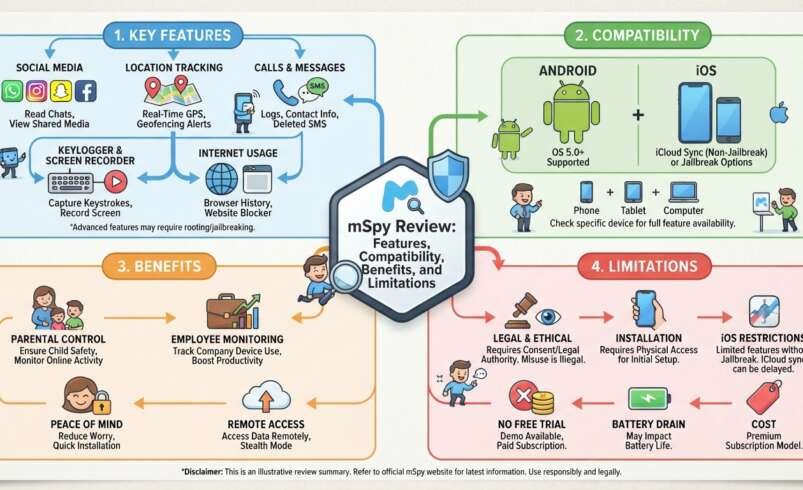

Choosing a phone monitoring application can be difficult, especially when parents want to understand their children’s digital activities and keep them safe online. With so many options available, it is important to compare features, device compatibility, privacy policies, and overall usability before making a decision.
One name that often appears in discussions about parental monitoring is mSpy. It offers several tools for reviewing phone activity, including location information, messages, calls, and supported social media activity. If you are considering this software, this detailed mSpy review and feature overview can help you understand what it offers and what to consider before choosing it.
What Is mSpy?
mSpy is a phone monitoring application designed primarily for parental supervision and authorized device monitoring. It provides a dashboard where users can review information collected from a compatible connected device.
The platform offers different monitoring features depending on the operating system, subscription, and installation method.
Parents may consider it when they want additional visibility into their children’s smartphone activities. However, it is important to understand that monitoring should always follow applicable laws and respect device ownership, consent, and privacy.
1. Main Features of mSpy
mSpy includes several features intended to help users understand smartphone activity.
Location Tracking: The application offers GPS location tracking, allowing authorized users to view the reported location of a connected device. It also supports geofencing alerts for selected locations.
Message Monitoring: mSpy advertises access to SMS messages and supported messaging applications. Available information depends on the device and setup.
Call History: Users can review available call records, including information about incoming and outgoing calls.
Social Media Monitoring: The platform lists support for applications such as WhatsApp, Instagram, Snapchat, Telegram, and other communication services. However, access to specific information varies across devices.
Browsing History: Its web activity features can help users review visited websites and, on supported configurations, manage website access.
Keyword Alerts: Some plans offer keyword-related alerts that can help parents identify potentially concerning terms in supported device activity.
These features provide different levels of information, so users should check the exact availability before purchasing a subscription.
2. Is mSpy Compatible With Android and iPhone?
Device compatibility is an important consideration when selecting monitoring software.
mSpy supports both Android and iOS, but the setup requirements and available features are not identical.
Android Compatibility
According to mSpy’s published compatibility policy, its Android solution requires physical access to the device for installation. The company lists Android 5 and later as its supported operating system requirement.
Some features may also require specific permissions or additional device configuration. Customized Android software can affect how certain functions work.
iPhone Compatibility
The iPhone setup works differently. mSpy describes options such as iCloud Sync and Wi-Fi Sync, each with its own requirements.
For example, iCloud Sync requires access to the relevant iCloud account credentials, verification, and enabled backups. Some features may depend on Apple’s account and device settings.
Therefore, users should not assume that every Android feature will also be available on an iPhone.
3. How Easy Is mSpy to Use?
mSpy provides an online dashboard where users can review information collected from a connected device.
The dashboard organizes available information into different sections, making it easier to navigate between activity categories.
However, the initial setup may require more attention than installing an ordinary application. Users need to check compatibility, permissions, account requirements, and device-specific instructions.
The overall experience can also vary depending on the phone model and operating system.
For parents who are not comfortable with technical settings, reviewing the installation requirements before purchasing can help avoid unnecessary difficulties.
4. What Are the Advantages of mSpy?
mSpy offers several features that may appeal to parents looking for detailed device activity information.
Some notable advantages include:
- Supports Android and iOS through different setup methods.
- Offers GPS location tracking and geofencing.
- Provides access to supported communication activity.
- Includes call and text monitoring features.
- Offers website activity and keyword-related tools.
- Provides a centralized online dashboard.
Its range of monitoring features makes it an option worth comparing with other parental control applications.
5. What Are the Limitations of mSpy?
Despite its extensive feature list, mSpy has some limitations that users should consider.
Different Feature Availability: Not every feature works on every device. Android and iPhone users may receive different levels of functionality.
Technical Setup: Installation and configuration can require physical access, permissions, account verification, or additional steps.
Subscription Costs: mSpy is a paid service. Users should review current subscription prices, renewal conditions, and refund policies before purchasing.
Privacy Concerns: Monitoring sensitive information requires careful consideration. Users should understand what information is collected and how it is stored.
Performance Differences: Battery restrictions, internet connectivity, operating system updates, and device settings may affect data synchronization.
An independent review by TechRadar also highlights differences between Android and iOS functionality, as well as limitations in screen-time management and website filtering.
6. mSpy vs Other Parental Control Solutions
Not every family needs extensive phone monitoring. Some parents mainly want screen-time schedules, application restrictions, and basic location updates.
Others may want more detailed information about supported phone activities.
For example, traditional parental control applications often focus on managing children’s internet access and setting healthy smartphone boundaries. More comprehensive monitoring platforms provide additional activity information.
Parents comparing different solutions can also explore FonSee, which offers parental control and phone-monitoring features for compatible devices.
The right choice depends on the family’s priorities, the child’s device, and the level of supervision required.
7. Privacy and Responsible Monitoring
Monitoring applications can provide access to sensitive information, including location details, conversations, and browsing activity.
Parents should explain monitoring arrangements to their children in an age-appropriate way and establish clear expectations about digital safety.
It is also important to install monitoring software only on devices you own or have clear legal authority to manage. Follow applicable consent and notification requirements.
Technology should help families identify potential online risks while maintaining trust and encouraging open communication.
Final Thoughts
mSpy offers a wide range of phone monitoring features, including location tracking, communication activity, call records, and supported social media monitoring. Its functionality and setup requirements vary between Android and iPhone.
Although its extensive feature set may appeal to parents seeking detailed device information, technical requirements, subscription costs, privacy considerations, and platform limitations deserve careful attention.
Before making a decision, compare available features with your family’s actual needs. A suitable parental control solution should support children’s digital safety while respecting their privacy and encouraging responsible smartphone habits.