

Guide to POS Systems Select the Ideal One for Your Store
Long lines at the counter. Wrong stock counts. Hours lost on daily sales totals. Sound familiar? A good POS system fixes all of this. It speeds up checkout, tracks your stock, and shows you how your business is really doing. This guide explains what a POS system is, what it can do, and how to choose the right one.
What Is a POS System?
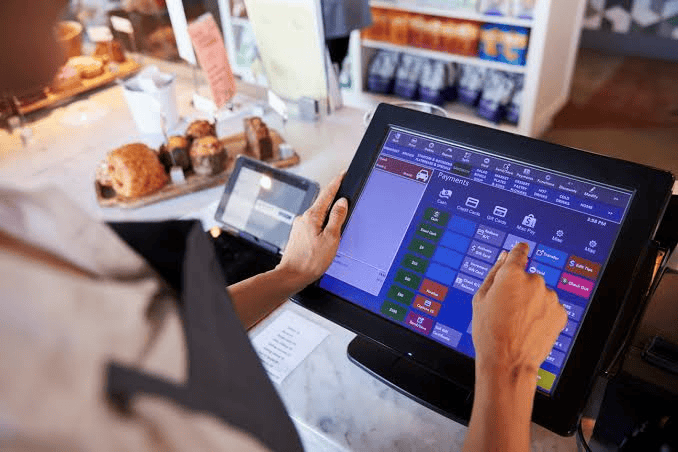
POS stands for point of sale. It is the place and the tool where a customer pays you. A modern POS system combines software and hardware to handle sales, receipts, and records in one place.
Think of it as a smart cash register. It does not just take money. It also keeps track of everything that happens in your shop.
A basic setup usually includes:
- A screen or tablet to enter sales
- A barcode scanner
- A receipt printer
- A cash drawer
- Software that stores your data
Why Every Business Needs a POS System
Writing sales in a notebook is slow and easy to get wrong. A POS system gives you speed and accuracy from day one.
Top benefits of a POS system:
- Faster checkout: Customers pay quickly and leave happy.
- Fewer mistakes: Prices and totals are calculated for you.
- Live stock tracking: You see what is selling and what is running low.
- Clear sales reports: Know your best days, best products, and busiest hours.
- Better customer service: Save customer details and offer discounts easily.
- Safer cash handling: Every sale is recorded, so it is harder for money to go missing.
Types of POS Systems
Different businesses need different tools. Here are the main types.
Traditional (Local) POS
The software is installed on your own computer. It works well without the internet, but you must handle updates and backups yourself.
Modern businesses rely on point of sale systems Ireland to manage sales, process payments, track inventory, and improve daily operations efficiently.
Cloud-Based POS
Your data is stored online. You can check sales from your phone, even when you are away from the shop. Most new businesses prefer this type.
Mobile POS
This runs on a phone or tablet. It is perfect for food stalls, pop-up shops, and delivery teams.
Industry-Specific POS
Restaurants, salons, and pharmacies have special needs, like table orders or appointment booking. Setting up time is greatly reduced with a POS system tailored to your industry.
Key Features to Look For
Do not pay for tools you will never use. Focus on features that match your daily work.
- Inventory Management
The system should update stock after every sale and warn you when items run low.
- Easy-to-Use Screen
Your staff should learn it in a day or two. A confusing screen slows everyone down.
- Payment Options
Make sure it accepts cash, cards, and digital wallets that your customers use.
- Reports and Analytics
Look for daily, weekly, and monthly reports that are simple to read.
- Multi-Store Support
If you plan to grow, pick a system that can handle more than one branch.
- Support and Updates
Good help should be available when something breaks, especially during busy hours.
How to Choose the Right POS System
Follow these simple steps before you buy.
- Know your needs. List what you sell and how you take orders.
- Set a budget. Count the setup cost, monthly fees, and hardware.
- Test it first. Ask for a free demo or trial.
- Check security. Your sales and customer data must stay safe.
- Ask about training. Your team should know how to use it from the start.
Want to grow your sales after setting up? Read our guide on inventory management tips for small shops and our article on how to choose a receipt printer.
Frequently Asked Questions
How much does a POS system cost?
Prices vary. Simple cloud plans have a small monthly fee. Full setups with hardware cost more. Always ask for a complete quote.
Can a POS system work without the internet?
Many can. Local systems work offline, and some cloud systems save sales and sync later when the internet returns.
Is a POS system good for small shops?
Yes. Even a small store gains from faster billing, stock tracking, and clear reports.
How long does it take to set up a POS system?
A simple setup can take a few hours.It can take a few days for larger retailers with plenty of merchandise.
Is my data safe in a POS system?
Reliable systems use passwords, backups, and encryption. Choose a provider with strong security and regular updates.
Key Takeaways
- A POS system handles sales, stock, and reports in one simple tool.
- It saves time, cuts mistakes, and helps you serve customers faster.
- Choose from local, cloud, mobile, or industry-specific types based on your business.
- Look for easy use, stock tracking, good reports, and strong support.
- Test a demo, set a budget, and check security before you buy.
The right POS system takes the stress out of daily work. Pick one that fits your shop today, and enjoy smoother sales tomorrow.