

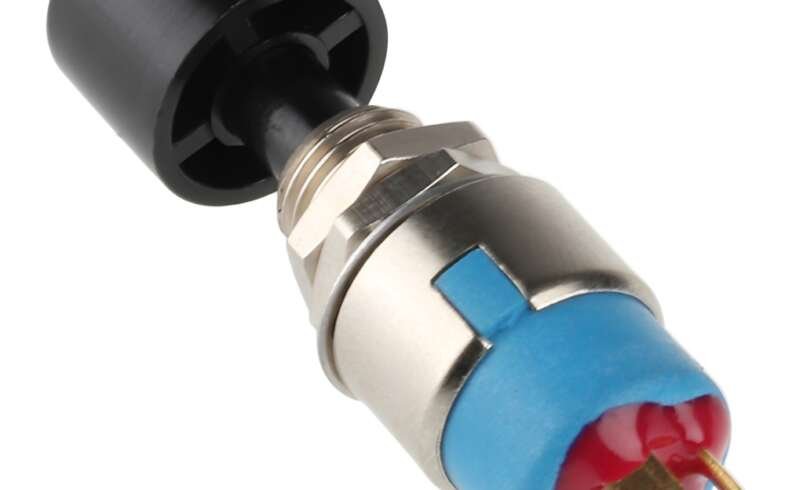

A button that works perfectly during testing can become frustrating when it occasionally ignores a press or triggers the same command twice. In electronic instruments, compact machinery and automated control systems, reliable user input is essential for accurate operation. These problems do not always indicate a damaged switch. Electrical noise, contact behaviour, circuit design and environmental conditions can influence how a button responds. Understanding these factors helps engineers create dependable control interfaces.
A Miniature Push Button Switch provides a compact method of sending manual commands to electronic equipment. However, reliable operation depends on more than the physical button. The connected circuitry must interpret each press correctly, while the mechanical assembly should withstand expected operating conditions. This guide explores common signal problems, practical design improvements and maintenance strategies for miniature push button controls.
Why Can One Button Press Generate Multiple Signals?
Mechanical switch contacts do not always settle immediately when they close. During actuation, the contact surfaces may briefly separate and reconnect several times before establishing a stable electrical connection.
This behaviour is called contact bounce, and it can create multiple rapid electrical transitions from one physical press.
For a simple lamp circuit, these brief transitions may go unnoticed. However, a microcontroller monitoring digital inputs could interpret them as several commands.
How Can Contact Bounce Be Controlled?
Engineers commonly use two approaches:
- Hardware debouncing: Resistors, capacitors and suitable logic circuits can filter unwanted electrical transitions.
- Software debouncing: A controller waits for the input to remain stable before accepting a new command.
The appropriate method depends on the application, switching speed and required response time.
A reliable design should also consider what happens when the button is released, because contact bounce can occur during both activation and deactivation.
How Can Electrical Noise Affect Push Button Performance?
Electronic equipment often contains motors, power supplies, relays and communication circuits that generate electrical interference. If the wiring connected to a button is poorly arranged, unwanted signals may enter the input circuit.
Long cables, inadequate grounding arrangements and high-impedance inputs can increase susceptibility to interference.
What Design Practices Can Improve Signal Quality?
- Use suitable input biasing: Pull-up or pull-down resistors establish a defined input state.
- Manage cable routing: Keep sensitive signal wiring away from major interference sources where practical.
- Consider filtering: Appropriate circuit filtering helps reject unwanted transitions.
- Check grounding: Follow the system’s approved grounding and electrical design requirements.
- Test realistic conditions: Evaluate button operation while nearby equipment is running.
These measures help distinguish genuine button presses from electrical disturbances.
Why Does Button Placement Influence Operator Accuracy?
Reliable electronic behaviour is only part of successful control design. Operators also need to identify and press the correct button without hesitation.
A poorly positioned switch can encourage accidental activation, particularly in compact equipment containing several closely spaced controls.
Button spacing, panel orientation and accessible operating force should reflect the intended users and working environment.
For example, an industrial operator wearing gloves may need a different arrangement from someone operating a laboratory instrument with bare hands.
Clear Push Button Labels & Legends can improve control identification and reduce confusion between neighbouring functions. Labels should remain readable throughout the equipment’s expected service life.
What Causes Intermittent Push Button Operation?
A button that responds inconsistently may be affected by mechanical wear, contamination or electrical connection problems.
Repeated operation can gradually change contact performance, while dust and moisture may interfere with moving components.
Loose solder joints, damaged wiring and excessive mechanical pressure can produce similar symptoms.
Which Warning Signs Should Technicians Recognise?
- Delayed response: The command activates noticeably after the button is pressed.
- Repeated activation: One press unexpectedly produces multiple actions.
- Inconsistent operation: The button functions correctly only at certain angles.
- Mechanical sticking: The actuator does not return smoothly.
- Physical deterioration: Cracks, corrosion or damaged terminals become visible.
These symptoms should be investigated before replacing components unnecessarily.
How Can Maintenance Teams Test Button Reliability?
Testing should begin with the equipment safely isolated according to the relevant maintenance procedures.
Technicians can inspect the actuator, mounting arrangement and electrical connections for visible problems.
Where appropriate, a multimeter can help assess contact continuity, although brief contact bounce may require an oscilloscope or suitable electronic monitoring equipment.
For larger control assemblies, compatible Push Button Contact Blocks provide another area to investigate when diagnosing switching faults. These modular components are used in certain control systems and are not automatically interchangeable with integrated miniature switches.
Always follow the manufacturer’s testing instructions and replace defective parts with correctly specified alternatives.
What Electrical Specifications Support Long-Term Reliability?
Switch selection should account for more than physical dimensions. Contact ratings, operating force, expected service life and environmental conditions all influence performance.
Which Characteristics Deserve Attention?
- Contact current rating: Must suit the connected electrical circuit.
- Voltage rating: Should match the intended operating conditions.
- Contact material: Influences performance under different electrical loads.
- Operating life: Provides a reference for expected mechanical or electrical cycling.
- Mounting design: Must support secure installation without excessive stress.
- Temperature range: Should cover the equipment’s expected environment.
A switch rated for low-level signals may not be suitable for directly switching a demanding inductive load.
Correct specifications help prevent contact deterioration and unpredictable behaviour.
How Can Better Button Design Improve Equipment Reliability?
Reliable push button operation comes from treating mechanical components, electronic circuits and operator interaction as one connected system.
A carefully designed input circuit prevents false commands, while suitable mounting and readable controls help users operate equipment consistently.
Engineers planning new products or upgrading existing interfaces can explore Push Button Switches & Components at Enrgtech to compare different control arrangements and related accessories. By combining appropriate electrical ratings, effective signal filtering and regular maintenance, manufacturers can create compact control systems that remain responsive, practical and dependable throughout everyday operation.