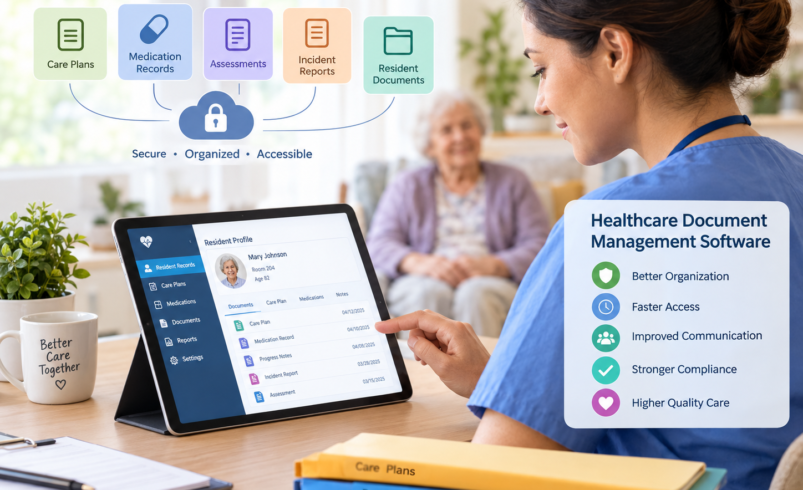

Managing healthcare records manually can create unnecessary work for care teams. Paper files, scattered documents, duplicate forms, outdated records, and difficult-to-find information can slow down everyday operations. For assisted living communities, where staff may need quick access to resident assessments, care plans, medication records, incident reports, and daily notes, organized documentation is especially important.
Healthcare document management software provides a centralized way to capture, organize, store, retrieve, and manage important records. Instead of depending on filing cabinets, spreadsheets, emails, or disconnected folders, care teams can use digital workflows to keep information organized and accessible.
For organizations evaluating the best assisted living software, document management should be an important part of the decision. A useful system should not simply store documents. It should help staff work with information efficiently while supporting privacy, accountability, and consistent documentation practices.
What Is Healthcare Document Management Software?
Healthcare document management software is a digital system designed to organize and manage healthcare-related records throughout their lifecycle. Depending on the platform, it may support resident records, assessments, care plans, progress notes, medication documentation, incident reports, forms, authorizations, and other operational documents.
The goal is to make information easier to locate and manage while reducing unnecessary administrative work.
A well-designed system can help organizations:
- Centralize important records
- Reduce dependence on paper documentation
- Improve document organization
- Control access to sensitive information
- Track changes and document activity
- Retrieve records more quickly
- Support consistent documentation workflows
- Reduce duplicate or missing information
The Joint Commission notes that both electronic and paper documentation can be acceptable, provided records are organized and accessible for timely review.
Why Document Management Matters in Assisted Living
Assisted living communities handle a large amount of resident information every day. Staff may document changes in condition, personal care, medications, appointments, incidents, communication with families, and other services.
If these records are difficult to access, staff can spend more time searching for information instead of focusing on resident needs.
Accurate and timely documentation also supports continuity between shifts. Staff coming on duty need a clear understanding of what happened previously and whether a resident’s needs or condition have changed.
Documentation best practices commonly emphasize accuracy, timeliness, objectivity, consistency, and clear identification of the person making an entry.
Key Features to Look For
Not every document management platform is designed for the same environment. Assisted living providers should consider features that match their actual workflows.
Centralized Resident Records
A centralized record allows authorized staff to access relevant information from one location rather than searching through multiple systems.
Important information may include:
- Resident demographics
- Assessments
- Care plans
- Medication information
- Daily documentation
- Incident records
- Service notes
- Family or responsible-party information
- Appointment information
Having related information connected can make it easier for staff to understand the resident’s current needs.
Secure Access Controls
Healthcare records contain sensitive information, so access should be controlled according to staff responsibilities.
Role-based permissions can help ensure that employees only access the information required for their duties. Organizations should also consider authentication, audit trails, encryption, user management, and other security controls when evaluating software.
HIPAA-related privacy and security responsibilities should also be considered when a system handles protected health information.
Searchable Documentation
A digital record is most useful when staff can find information quickly.
Search and filtering capabilities can help users locate documents by resident, date, document category, or other relevant fields. This can be particularly helpful when administrators need to review historical information or prepare records for an internal audit or survey.
Electronic Forms and Templates
Standardized digital forms can reduce variation in documentation. Instead of creating records from scratch, staff can follow structured workflows that guide them through the required information.
Templates should still allow staff to document resident-specific observations rather than encouraging generic or copied entries. Excessive copy-and-paste documentation can make records harder to interpret and may obscure important changes.
How It Can Improve Daily Workflows
One of the biggest advantages of digital document management is reducing repetitive administrative tasks.
For example, instead of completing a paper form, scanning it, filing it, and later searching for it, a staff member may be able to complete the appropriate digital record directly within the workflow.
This can help improve:
Efficiency: Staff spend less time searching for records.
Communication: Information can be easier for authorized team members to access across shifts.
Consistency: Standardized workflows can encourage more complete documentation.
Accountability: User activity and document histories can provide greater visibility into record changes.
Organization: Digital records can reduce the accumulation of disconnected paper files.
Connecting Documentation With Care Plans
Documentation becomes more valuable when it connects to the resident’s broader care workflow.
A care plan should reflect the resident’s needs, goals, risks, preferences, and required interventions. Daily documentation can then provide evidence of how those services were delivered and whether circumstances changed.
This connection helps staff identify discrepancies between planned care and actual observations.
For example, if a resident’s condition changes, the documentation may indicate that an assessment or care plan review is needed. Keeping these records connected can make that process easier to manage.
Supporting Compliance and Record Readiness
Strong documentation can also help organizations prepare for audits, reviews, and regulatory surveys.
A recent assisted living documentation review identified incomplete entries, outdated assessments, missing follow-up, inconsistent records, and failure to update care plans as common documentation problems.
A digital system cannot replace good documentation practices, but it can provide tools that make those practices easier to follow.
Administrators can use reporting, audits, document histories, and structured workflows to identify gaps before they become larger operational problems.
Choosing the Best Assisted Living Software
When comparing the best assisted living software, avoid focusing only on the number of features. Consider how well the platform fits the actual work performed by caregivers, nurses, administrators, and other staff.
Ask questions such as:
- Can staff access resident information quickly?
- Are care plans and assessments connected?
- Can daily notes be documented electronically?
- Does the system support medication documentation?
- Can administrators review documentation activity?
- Are user permissions customizable?
- Does the platform provide useful reporting?
- Can information be exported when necessary?
- Does it integrate with other systems used by the organization?
- Is staff training straightforward?
A recent assisted living EHR buyer’s guide similarly recommends evaluating resident records, medication workflows, service plans, staffing, communication, and reporting rather than looking at a single feature in isolation.
Make Documentation Part of the Care Workflow
The most effective approach is to treat documentation as part of everyday resident care rather than a separate administrative task.
Staff should document relevant observations promptly, use objective language, and keep records consistent with the resident’s current care needs. Software can support this process by putting the right information and tools closer to the point of care.
Healthcare document management software can therefore serve as more than a digital filing cabinet. When properly configured, it can help connect resident information, documentation, care planning, compliance activities, and operational workflows in one organized environment.
For assisted living providers, the right technology can make documentation easier to manage while giving authorized staff clearer access to the information they need to support consistent resident care.